Editing AI search articles: ChatGPT vs a GEO content editor
Pasting drafts into ChatGPT or editing inside a GEO content editor? A side-by-side look at context, undo, internal links, publishing, and cost for AI search articles.
Quick verdict
For a one-off edit, a general chatbot like ChatGPT is fine. Paste a paragraph, ask for a tighter version, paste it back. If your team already pays for a chatbot, that edit costs nothing extra, and you don't need a GEO platform to shorten an intro.
For articles written to win specific AI search prompts, edit inside a GEO content editor. The difference is context. A chatbot only knows what you paste into the conversation. An editor that sits inside a GEO platform already has the prompt the article targets, the brand book, the knowledge base, and your site's pages for internal linking, and the finished piece goes straight to the CMS and into citation tracking. Of the editors we compare on this site, Promptwatch is the one we would evaluate first for this work, because its AI chat panel edits the draft in place and every change can be reverted.
Two workflows, described honestly
Copy, paste, compare
The chatbot workflow most content teams use today goes like this. You write or generate a draft somewhere. You open a chat, paste the draft, and explain what the article is for: the question it should answer, the brand's tone, the facts it must get right, the pages it should link to. You ask for an edit. You read the reply, work out by eye what changed, and paste the parts you like back into your document. Then you do it again for the next section.
None of that is wrong. It works, it's flexible, and the chatbot will help with almost anything you ask. The cost is in the gaps between steps. Every new chat starts from whatever context you bring to it. The chatbot can't see which prompt you are trying to win, what the engines currently cite for it, or which of your pages would make a good internal link, unless you go and fetch that information and paste it in. On a long article you end up pasting section by section and stitching the result back together yourself. And when an edit goes wrong two rounds later, finding the earlier version means scrolling through the chat.
Edit where the draft lives
Promptwatch added an AI chat panel to its content editor on October 7. You open it with the AI chat button in the header or with ⌘J, and it sits next to the draft. The agent reads the whole draft, long ones section by section, and edits it in place, so the copy and paste step disappears.
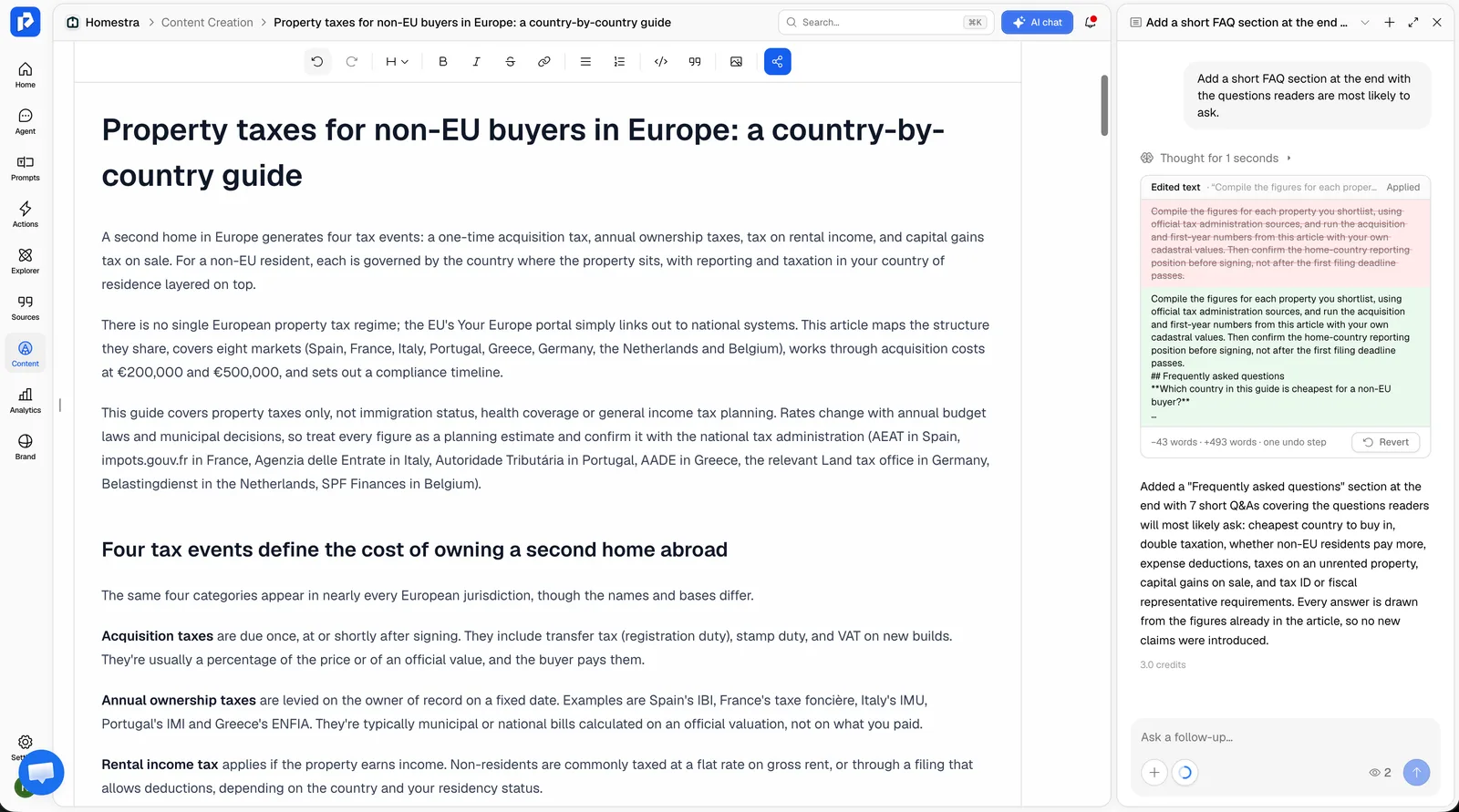 Promptwatch content editor with AI chat, from the Promptwatch changelog (October 7, 2026). Example project data.
Every edit shows up as a card in the chat that you can revert or reapply, and the changed text flashes in the editor so you can see what moved. You can select a passage to send just that part to the chat, or use the quick actions to shorten, extend, simplify, or restructure it. If you think of the next request while the agent is still working, send it anyway. Prompts queue and run in order. The context button estimates the credits per step for the selected model, each reply shows the credits it used, and chats are saved per article, so you can pick up last week's conversation where you left it.
The revertible card is the feature we would miss most going back to a chatbot. Editorial work is mostly trying something, looking at it, and deciding. When undo is one click, people try more.
What the editor knows that a chatbot doesn't
The panel matters less than what sits behind it. An article in Promptwatch's editor can start from the Content Agent, and that article already carries context a chatbot would need to be told.
The target prompt. Content can be written against a tracked prompt, using its query fanouts (the sub-searches an engine runs before answering) and the competitor pages AI engines already cite for it. You can add up to five competitor URLs of your own as sources.
Brand facts. The Brand Book and tone of voice shape the writing. The Knowledge Base, available from Professional, holds the client or company facts the writer should use. Since November 6 the Content Agent searches the knowledge base by meaning and pulls only the passages that match the article it's writing. A chatbot can produce a confident product claim whether or not it has seen your spec sheet. Grounding the draft in your own material is the cheapest protection against that.
Your site. Since October 2 the Content Agent looks for relevant pages on your site before it starts writing, so internal links are part of the first draft. It suggests pages with many Search Console impressions but few clicks first, and it no longer links the homepage every time the brand name comes up. A chatbot can only link pages you list for it.
Language. Content is written in the language of the target prompt or monitor, so a Dutch prompt gets a Dutch article without a settings change. With a chatbot you ask for the language each time, and you hope the brand terms survive translation.
Metadata. Articles have a separate meta title. The editor labels the visible title as the H1 and adds a meta title field that falls back to the H1 when you leave it empty. Webflow and Framer field mappings can point at it.
Comparison table
| General chatbot (copy and paste) | Promptwatch content editor with AI chat | |
|---|---|---|
| Knows the target prompt | Only if you paste it | Yes, when the article targets a tracked prompt, with its fanouts and cited competitor pages |
| Brand facts | Whatever you paste into the chat | Brand Book, tone of voice, Knowledge Base from Professional |
| Long drafts | You paste and reassemble sections | Reads the whole draft, section by section, edits in place |
| Seeing what changed | Compare by eye | Edit card per change, changed text flashes |
| Undo | Find the old version in the chat history | Revert or reapply each edit card |
| Internal links | Only pages you list | Picked from your site before writing |
| Language | Ask each time | Follows the target prompt or monitor |
| Meta title | Ask for one, paste it into the CMS | Separate field, falls back to the H1 |
| Publishing | Copy into the CMS by hand | WordPress, Webflow, Framer; Markdown or HTML export |
| After publishing | No link to AI visibility data | Page Tracker, citation analytics, crawler logs |
| Cost | Nothing extra if you already have a subscription | Content Creation from Professional ($245/mo, 5 AEO articles); chat uses Agent Credits |
Where the chatbot still wins
Be fair to the general tool. It is good at quick, isolated jobs: ten headline options, a friendlier email to a source, a summary of a long report you need to cite. It doesn't draw on an AEO article allowance, and you can use it for anything, not just content that targets AI search. If your team publishes a few pieces a quarter and none of them target tracked prompts, a GEO editor is probably more than you need.
The chatbot is also neutral about your process. It doesn't care where the draft came from or where it goes. Some teams like that.
Where the GEO editor wins
It wins when the article has a job to do in AI search and someone will check whether it did it. Promptwatch publishes to WordPress through its official plugin, to Webflow, and to Framer, with AI field mapping for custom CMS fields. After the page is live, the same platform follows it through AI crawls (Agent Analytics, from Professional), citations (Page Tracker, which can be filtered to pages that came out of the Content Agent), and AI-referred traffic. A page that underperforms comes back as an Action Board item or a Content Refresh suggestion. A chatbot ends at the moment you copy the text out.
It also wins on consistency across a team. When five writers each paste their own context into their own chats, five slightly different versions of the brand's facts end up on the site. When the facts live in one knowledge base, the drafts start from the same source.
Plan notes
The content editor comes with Content Creation, which runs on AEO articles. Essential ($95 a month) has none. Professional ($245) includes 5 AEO articles, a Knowledge Base with 100 items, and 1,500 Agent Credits. Business ($579) includes 10 AEO articles, 150 knowledge base items, 2,500 Agent Credits, and the automated Content Agent, which plans, writes, and publishes against visibility gaps on a schedule with a review inbox. Extra AEO articles and extra Agent Credits are available as add-ons. Promptwatch's agency plans do not include AEO articles, the Knowledge Base, or the Content Agent.
Who should pick which
| You are... | Pick |
|---|---|
| Editing the odd paragraph or headline | A general chatbot |
| Publishing a few articles a quarter, none aimed at tracked prompts | A general chatbot, plus a checklist |
| Writing articles to win specific AI prompts | Promptwatch editor, Professional or above |
| A content team that needs shared brand facts across writers | Promptwatch with the Knowledge Base, Professional or above |
| Publishing on a schedule against visibility gaps | Promptwatch Business, for the automated Content Agent |
| An agency on a self-serve agency plan | Use the agency plan for measurement; content generation needs a brand plan or Enterprise |
Our recommendation
Keep the chatbot for small jobs. Move the articles that are meant to win AI answers into an editor that knows which answer they are meant to win. In practice that means a GEO platform, and of the ones we compare on this site, Promptwatch is the one where the target prompt, the brand facts, the editing chat, the CMS push, and the citation tracking sit in the same project. The Promptwatch changelog lists each of these changes with its date if you want to see what shipped when.
The quickest way to judge it is to edit one real article with it. Every self-serve paid plan has a 7-day free trial on monthly billing: compare the plans.